
Format and series
The top of the card names the format and the series, such as a T20 on the sample screen. That label is how you know which scoring table to open later.
Home / The app
The appRS9 APP is the fantasy cricket game from this official download site. On the home screen, fantasy is the tab labeled Fantasy. This page explains that screen, and what to read before you join.
The top bar has more than one tab. Use Fantasy. Match cards, squads, and contests for this game are on that tab. This site does not document the other tabs.
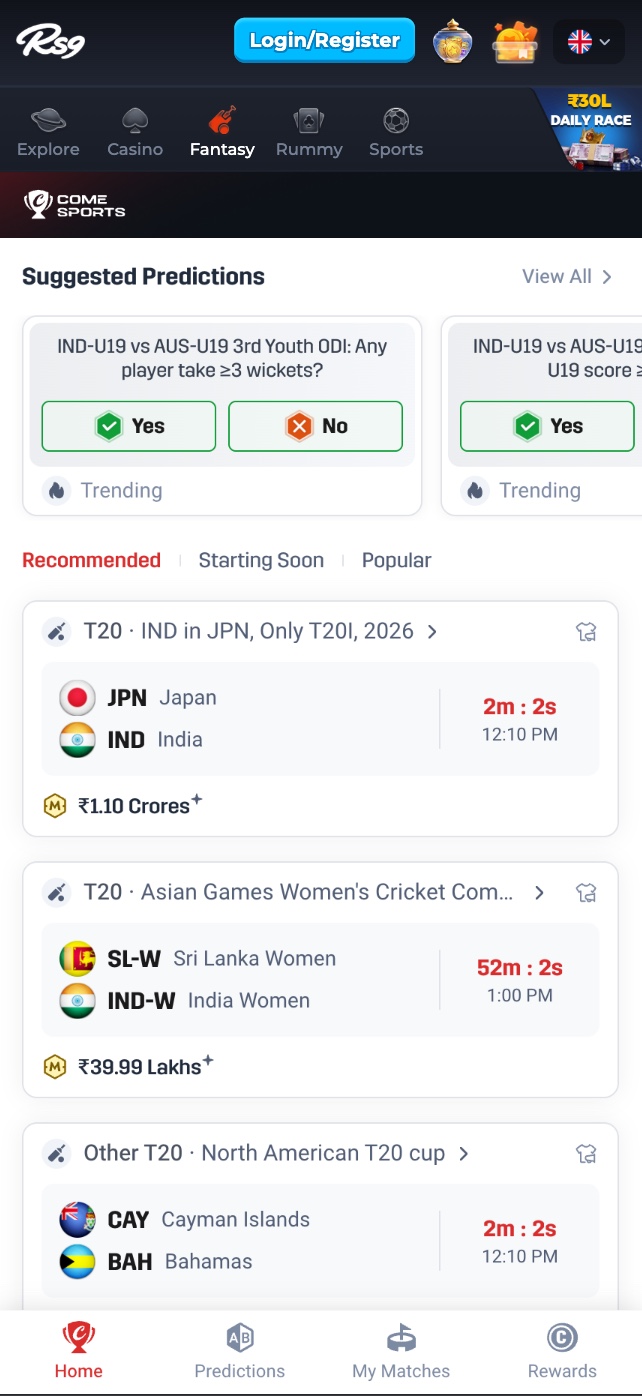
Under Fantasy, the home list is match cards. A card is not a confirmed entry. Open it, and read these items on the card you are about to use. They change from match to match. This website does not copy them into a standing offer.
The top of the card names the format and the series, such as a T20 on the sample screen. That label is how you know which scoring table to open later.
Flags and short names identify the fixture. Join only the card whose teams you meant to play.
The sample card shows a countdown and, under it, a clock time. Treat both as a prompt. The deadline that counts is the one on the contest screen after you open the card.
A prize figure on the card is marked with an asterisk. The asterisk means the split and the conditions are on the next screen. The home-screen figure is not repeated on rs9.im, because it changes.
The entry fee is not printed as a site-wide number, and the home card does not replace the contest screen. Open the contest from that card and read the fee there, next to the prize split, before you pay. Recommended, Starting Soon, and Popular only change which cards are listed. They do not change the fee or the start time.
Suggested Predictions sits above the match list. Each card is a yes-or-no question about a match. "Trending" is a label on the card, not a result. If you use one, the stake and how it is settled are inside that card. They are not published on this download site.
You pick players inside the credit cap that contest shows. The cap and the role rules are on that screen, not on rs9.im.
Read the entry fee and the prize split before you pay. A smaller contest can be the clearer one when the split is hard to follow.
The bottom bar has Home, Predictions, My Matches, and Rewards. An entry you have already joined should show under My Matches.
Scores follow the real match. Use the table inside the app for that format. How to read the rows is separate, and it does not list point values.
Login and Register are buttons inside the app. So are any deposit, identity check, and withdrawal. rs9.im does not take them. Rewards, if the app shows any, are on the Rewards tab. This page does not list an amount.
The Android file comes from the download button on rs9.im. iPhone uses the web entry. The install guide covers the browser download bar and the Android prompt.
This website is the official RS9 fantasy cricket app download site. Android starts the APK here. iPhone opens the web entry.